 Explore facility operations ↗
 See play-group management ↗
Know what needs attention.
Dedicated queues and counts surface the work across bookings, communications, growth, and follow-up.
 pup.ioLet’s talk Pup
 The connected pet business platform
One happy home for your bookings, AI answering, pet care, grooming, cameras, and growth. Built by kennel operators who know how much happens between drop-off and pickup.
Actual software, shown with demo records and Parkwood facility branding.
One platform. Every part of the day.
Every pet has a story. Pup keeps the people, care instructions, conversations, and next steps attached to it.
The screen your front desk lives in
A voicemail. A new ad inquiry. An unpaid deposit. A parent waiting for a reply. Tasks brings the next action into view, with the customer, conversation, and automation status attached.
Dedicated queues and counts surface the work across bookings, communications, growth, and follow-up.
Read transcripts, auto replies, original inquiries, feedback, and delivery history before taking action.
Reply, call back, review a booking, convert a lead, or mark the follow-up complete from connected workflows.
Actual application screens populated with fictional records. Messages, AI drafts, source counts, ratings, and delivery outcomes are demonstration examples. Select any image to enlarge it.
01 / An AI front desk with context
Give your AI concierge the context to answer questions, identify returning callers, check availability, and create booking requests. Keep the conversation connected when your team takes over.
02 / Scheduling that carries the details
Tours, daycare, boarding, and grooming start in a customer booking experience built around your business rules. Availability, intake, deposits, and reminders work together.
03 / AI assistance where the work piles up
Turn emailed and uploaded vaccination records into information your team can review. AI helps extract dates and match pets, while the original document and staff decisions stay part of the record.
04 / Connect the building itself
Bring live pet context to the suite, the yard, the lobby, and the phone in your pocket.
Our Inkplate run-card design puts pet identity, stay dates, feeding checkboxes, add-ons, and medication notes right at the room. Compatible hardware and a configured feed bring the display to life.
Firmware layout preview · demo records · not a device photograph
Try the connected care workspace ↗Manage play groups with a visual board, pet tags, live rosters, and displays built for the staff on the floor.
Connect supported suite and play-yard cameras to the parent portal. Access follows the pet’s eligible stay and configured viewing windows.
Configured visitor-arrival and pickup announcements help the front desk and care team coordinate through connected facility displays and supported devices.
Camera feeds, E-Ink displays, and arrival integrations use compatible hardware and configured connections. The local demo portal shows camera setup status, not a live video feed.
05 / Grooming belongs in the same system
Give groomers their own workspace without losing the connection to the pet, parent, stay, or front desk.
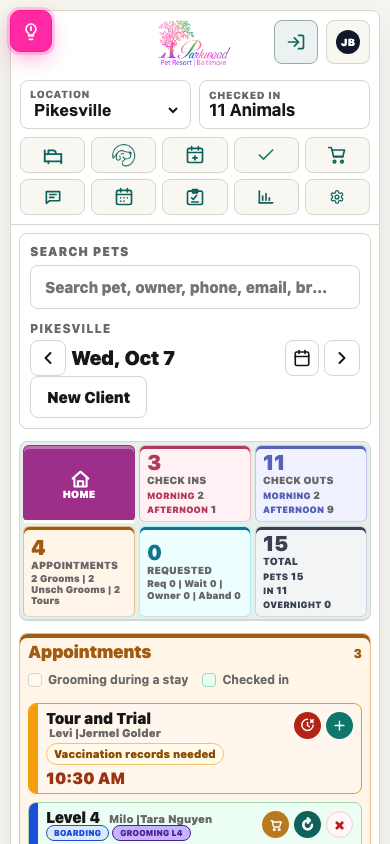
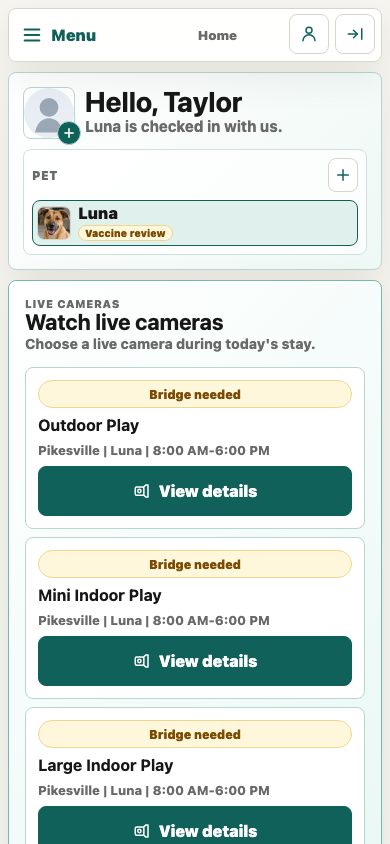
06 / Modern, responsive, ready to move
Check the day, open pet records, and keep work moving from your phone. Parents get a friendly portal for reservations, pets, vaccine uploads, packages, messages, agreements, and payments.
07 / Growth with a complete customer story
Bring Google, Facebook, Yelp, phone, text, and email inquiries into a connected lead workflow. AI-assisted responses help move the conversation toward a tour, grooming appointment, or stay.
LIVE / The actual Pup app
Step into a working resort with 24 fictional pets, current stays, grooming appointments, messages, leads, and a full month of visit history. Create a booking, work the Tasks queue, edit care notes, or become a pet parent in the customer portal. Your changes save in the app.
No signup needed. Shared fictional records reset daily. AI examples and message delivery are simulated; cash checkout collects no money. Live provider and hardware connections are disabled.
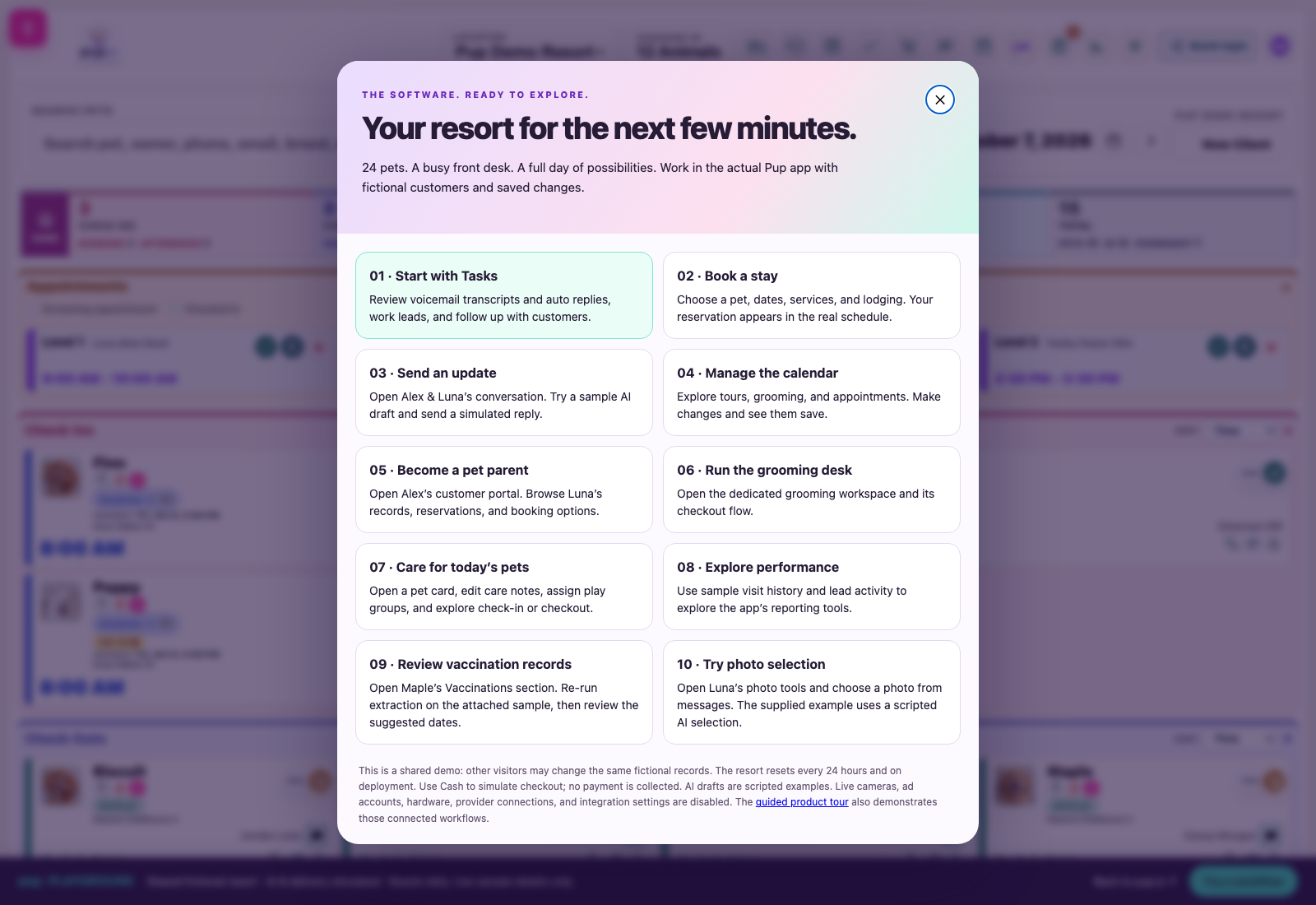
Click through the work
Alongside the live app, explore 14 guided examples of AI tools, scheduling, recovery, reviews, and reporting.
A connected customer journey
Automations work best when they know the customer, the pet, the service, and the facility.
Calls, email, Google Local Services, Yelp, and supported Meta conversations become leads with context.
Tours and grooming use configured availability. Unfinished bookings can receive a resume reminder.
AI extracts vaccine dates, flags pet mismatches, helps normalize vet details, and finds profile photos.
Care records, pickup updates, feedback tasks, package reminders, and retention insights stay connected.
The full feature library
Explore the tools we have built across the customer journey and the daily work of a kennel.
Features reflect the app’s implemented workflows. Integrations, AI, messaging, payments, cameras, and hardware require the relevant accounts, configuration, and equipment.
Measure the difference
Use your own volumes and handling times to estimate capacity returned to the team.
Σ volume × max(manual minutes − assisted minutes, 0) ÷ 60. Value = hours × hourly staff cost. Capacity returned is not guaranteed payroll savings.
Follow inquiries, booked tours, and conversions by source. Carry supported Google click attribution and Meta CRM conversion events through the journey.
Compare answered calls, missed calls, booking requests, and human handoffs. An answered call is not automatically a resolved inquiry.
Time vaccine reviews, photo selection, booking handling, and review follow-up before and after assistance. Keep final staff review in the measurement.
Take a closer look
Explore 31 product views, including the populated Tasks screen, voicemail auto-replies, Google Local Services leads, message threads, booking recovery, and AI review responses. Filter by category and open any image for a full-size look.
Current and original app captures use demo records and Parkwood branding. The E-Ink image is a layout preview derived from our Inkplate firmware. Screen designs evolve. Interactive walkthroughs use simulated AI responses and example metrics.
Recorded product tours
Original app recordings complement the step-by-step demos of newer features.
Considering MoeGo or Gingr?
Scheduling, payments, pet records, and messaging matter. The next question is how well your software connects the work between them.
Pup’s case is the connected workflow: AI answering that can use booking tools; record extraction with pet checks; native grooming; E-Ink run cards; suite and yard cameras; and a shared view of leads, care, and follow-up.
Compare your real workflow ↗| Bring this to your demo | What to see in Pup | What to compare |
|---|---|---|
| A call becomes a booking | AI answering, caller context, availability, booking requests, transcripts, text follow-up, staff transfer. | Run the same call-to-booking scenario, including an exception that needs a person. |
| A vaccine file arrives | AI extraction, pet-name checks, reviewable dates, original records, and manual correction protection. | Compare document handling, review work, matching, and any separate verification service. |
| A pet moves through the facility | Room and play-group context, E-Ink run cards, announcements, and eligible parent camera access. | Ask to see the floor workflow and the exact hardware and camera connections needed. |
| A grooming visit ends | Native groomer stages, photos, final pricing, pickup status, and connected checkout. | Walk from customer booking through the groomer screen, parent message, and payment. |
| An ad generates interest | Source tracking, AI-assisted follow-up, booking outcomes, and supported conversion reporting. | Separate ad spend, inquiries, booked visits, show-ups, and acquired customers. |
MoeGo advertises online booking, automated workflows, lead capture, reporting, and review tools. Gingr offers core pet-care management and a customer portal, plus partners for services including vaccine verification, cameras, and AI-assisted customer engagement. These are capable platforms; this guide does not claim they lack a feature simply because it is absent from a public page.
MoeGo’s vaccine guide describes date entry and file uploads. Gingr’s partner page describes VetVerifi verification and Broadly engagement. Evaluate the specific workflow, plan, setup, and total cost with each vendor.
Public sources reviewed October 7, 2026. Availability and packaging can change. No comparative performance or price advantage is assumed.
Fewer disconnected tools. A clearer bill.
Bring booking, communications, AI assistance, grooming, cameras, facility displays, and follow-up into one operating workspace. Review the subscriptions you could retire and the connections you still need.
Enter only costs you expect to replace. Compare against a complete Pup quote, including any retained services, messaging, AI usage, camera connections, and hardware.
Build a consolidation plan with us ↗Made for the way you operate
From a single facility to a growing group, keep the people, the records, and the next action connected.
Yes. The staff workspace supports location-specific boards, schedules, grooming workflows, lodging, lead routing, and reporting. Each facility can work with its own operational setup.
Yes. Embed supported tour, grooming, portal, and camera experiences into your current website, with location-specific entry points for parents.
Staff can review extracted records and photo suggestions, edit response drafts, and handle flagged situations. A mismatched pet name prevents vaccine dates from being merged, while sensitive inquiries can be held for human follow-up.
Migration tools cover supported owners, pets, reservations, packages, agreements, and historical records. We can review your current system and available exports during a walkthrough.
Yes. Configure the relevant booking rules, message templates, channels, reminder timing, and enabled integrations. Start with the workflows that remove the most repetitive work for your team.
Bring your service mix, locations, current tools, and the work that consumes the most staff time. We can walk through the inquiry-to-booking journey, daily care, checkout, and follow-up around your facility.
Plan your walkthroughWhy Pup exists
We used the available tools, operated multiple facilities, and saw the same friction repeat: records to retype, calls to chase, disconnected screens, and bookings that needed too much back-and-forth. Pup brings that work together around the way a pet-care team actually moves through its day.
See Pup with your own workflow
Tell us what you run and where your team spends the most time. Your inquiry goes directly to Johnathon.
johnathon@ponderit.io